CNC File Preparation Guide 2024: CAD/CAM Workflows, Cutting Parameters, Software Comparison, and Project Examples
Computer Numerical Control (CNC) manufacturing accessibility has democratized precision fabrication where entry-level plasma cutters ($2,000-5,000), CO2 lasers ($3,000-8,000), and desktop CNC routers ($1,500-4,000) enable hobbyists and small businesses to produce parts previously requiring $100,000+ industrial equipment yet the critical bottleneck isn’t machine cost but file preparation expertise where 60-70% of failed CNC projects result from improper toolpath generation, incorrect cutting parameters, or file format incompatibility according to CNCCookbook’s 2023 Beginner Mistakes Survey of 2,400 respondents. CNC Cutting Files in vector formats (DXF, SVG, AI) contain geometric paths machines interpret as cutting instructions, but transforming CAD designs into machine-ready G-code requires understanding toolpath strategies (pocket vs. contour vs. drilling), material-specific feed rates (mild steel plasma: 100-150 IPM vs. 3mm plywood laser: 300-500 mm/min), kerf compensation (plasma: 1.5-3mm vs. laser: 0.1-0.3mm), and post-processing requirements where incorrect settings waste materials costing $50-500 per sheet and risk tool breakage on $200-2,000 router bits or $1,500+ plasma consumables. This technical guide examines verified CAD/CAM software workflows comparing Fusion 360, VCarve Pro, and open-source alternatives with step-by-step file preparation tutorials, material-specific cutting parameter tables for plasma/laser/router/waterjet applications compiled from manufacturer specifications and machinist forums, real project examples with annotated files demonstrating common challenges (undercut prevention, tab placement, nesting optimization), and honest cost assessment revealing CNC accessibility requires $5,000-15,000 total investment (machine + software + tooling + materials + learning time) not “modest” hobbyist budgets as marketing claims suggest.
CNC Technologies: Understanding What Your Machine Can Do
Technology Comparison: Plasma vs. Laser vs. Router vs. Waterjet
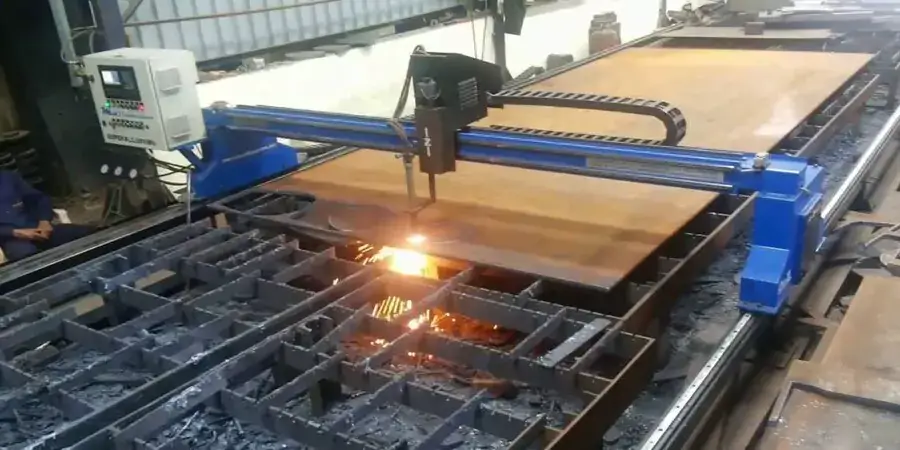
Plasma Cutting
How it works:
- Electrically ionized gas (compressed air typically) reaches 30,000°F
- Melts and blows away material along cutting path
- Conductive materials only (steel, stainless, aluminum, copper, brass)
Machine costs:
- Entry-level (Hypertherm Powermax45 XP): $2,800-3,500
- Mid-range (Hypertherm Powermax65): $4,500-6,000
- Industrial (Hypertherm XPR300): $45,000-80,000
Material capabilities:
- Thickness range: 1/16″ – 1.25″ (mild steel, depending on amperage)
- Materials: Ferrous/non-ferrous metals only
- Kerf width: 1.5-3mm (0.06-0.12″) depending on amperage
Cutting parameters (Hypertherm Powermax45, mild steel):
| Thickness | Amperage | Feed Rate | Pierce Delay |
|---|---|---|---|
| 16ga (1.5mm) | 25A | 150 IPM | 0.5s |
| 11ga (3mm) | 35A | 120 IPM | 0.8s |
| 1/4″ (6mm) | 45A | 80 IPM | 1.2s |
| 1/2″ (12mm) | 45A | 30 IPM | 2.5s |
File requirements:
- Format: DXF, SVG
- Lead-in/lead-out: 1.5-3mm to avoid piercing on cut line
- Corner strategy: Pauses or radius corners to maintain cut quality
- Kerf compensation: Offset path 0.75-1.5mm depending on amperage
CO2 Laser Cutting
How it works:
- Focused infrared light (10.6µm wavelength) vaporizes/melts material
- Non-contact cutting (no mechanical force on workpiece)
- Works on: Wood, acrylic, leather, fabric, thin metals (with oxygen assist)
Machine costs:
- Entry-level (40W Chinese CO2): $400-800 (K40)
- Mid-range (80-100W Epilog Zing): $8,000-14,000
- Industrial (150W Trotec Speedy 400): $50,000-120,000
Material capabilities:
| Material | Max Thickness (80W) | Typical Speed | Kerf Width |
|---|---|---|---|
| 3mm plywood | Single pass | 300-500 mm/min | 0.2mm |
| 6mm acrylic | 2-3 passes | 15-30 mm/min | 0.3mm |
| 1.5mm mild steel (O2 assist) | Single pass | 10-20 mm/min | 0.5mm |
| Cardboard (corrugated) | Single pass | 400-600 mm/min | 0.1mm |
Cutting parameters (80W CO2, example):
- 3mm Baltic birch plywood: 350 mm/min, 75% power, 1 pass
- 6mm clear acrylic: 25 mm/min, 100% power, air assist
- 5mm MDF: 180 mm/min, 90% power, strong exhaust (fire risk)
File requirements:
- Format: SVG, DXF, AI
- Line colors: Red = cut, Blue = engrave (RDWorks convention)
- Line weight: Hairline (0.001″) for cuts, thicker for raster engraving
- Kerf compensation: Minimal (0.1-0.15mm) for precision fits
CNC Router
How it works:
- Rotating cutting tool (end mill, V-bit, etc.) mechanically removes material
- Controlled in X, Y, Z axes
- Works on: Wood, plastics, soft metals (aluminum), foam, composites
Machine costs:
- Entry-level (Shapeoko 5 Pro): $2,200-3,000
- Mid-range (Avid CNC Benchtop PRO): $6,500-10,000
- Industrial (ShopBot PRS Alpha): $25,000-60,000
Tooling costs:
- End mills: $15-50 each (carbide)
- V-bits: $20-80 each
- Surfacing bits: $50-150
- Tool life: 20-100 hours depending on material, feeds/speeds
Cutting parameters (Shapeoko, 1/4″ 2-flute carbide end mill, 24,000 RPM):
| Material | Feed Rate | Plunge Rate | Depth of Cut | Stepover |
|---|---|---|---|---|
| Pine (softwood) | 60-100 IPM | 30 IPM | 0.125″ | 50% (0.125″) |
| Hardwood (oak) | 40-70 IPM | 20 IPM | 0.08″ | 40% (0.1″) |
| 6061 Aluminum | 25-40 IPM | 10 IPM | 0.03″ | 30% (0.075″) |
| MDF | 80-120 IPM | 40 IPM | 0.15″ | 50% |
File requirements:
- Format: DXF (2D profiles), STL (3D models), STEP (CAD)
- Toolpath strategies: Pocket (clear interior), Profile (cut outline), Drilling (holes), V-carve (decorative)
- Tabs: Hold-down tabs prevent parts from moving mid-cut (1/8″ tall, 1/2″ wide typically)
Waterjet Cutting
How it works:
- Ultra-high-pressure water (50,000-90,000 PSI) + abrasive garnet cuts through material
- No heat-affected zone (cold cutting)
- Cuts virtually any material: Metal, stone, glass, ceramic, composites
Machine costs:
- Small format (WAZER Desktop): $7,500
- Industrial (OMAX 2652): $150,000-250,000
Operating costs:
- Garnet abrasive: $0.30-0.50/lb (consumes 0.5-1 lb/min)
- Water: 0.5-1 gal/min
- Electricity: 20-50 kW
- Nozzle life: 50-150 hours ($200-800 replacement)
Cutting parameters (OMAX, 1/4″ mild steel):
- Feed rate: 8-15 IPM
- Abrasive flow: 0.8 lb/min
- Pressure: 60,000 PSI
- Kerf width: 0.04″ (1mm)
File requirements:
- Format: DXF, DWG
- Lead-in/lead-out: Required (abrasive jet piercing damages surface)
- Corner compensation: Radius corners to maintain quality
- Taper compensation: Waterjet creates slight taper (1-3°); software compensates
CAD Software: Creating Vector Files
Beginner-Friendly Options
Inkscape (Free, open-source)
Capabilities:
- 2D vector drawing (SVG native format)
- Basic shapes, path editing, text
- Extensions for: G-code export, nesting, measurement
Best for:
- Laser cutting 2D profiles
- Simple plasma cutting designs
- Learning vector concepts
Limitations:
- No parametric modeling (hard to modify dimensions after creation)
- Limited CAM features (no toolpath generation)
Tutorial example: Hexagon Box
- Create hexagon: Polygon tool (6 sides, 50mm radius)
- Duplicate and scale 98% for kerf compensation (laser)
- Add finger joints: Extension > Render > Finger Joint Box
- Export as DXF: File > Save As > Desktop Cutting Plotter (R14) DXF
LibreCAD (Free, open-source)
Capabilities:
- 2D CAD (similar to AutoCAD LT)
- Precision drawing with dimensions, constraints
- Layers for organizing cut types
Best for:
- Mechanical parts with precise dimensions
- Technical drawings
Limitations:
- Steeper learning curve than Inkscape
- No 3D modeling
Professional CAD Software
Fusion 360 (Autodesk, $545/year, free for hobbyists)
Capabilities:
- Parametric 3D modeling
- Integrated CAM (toolpath generation)
- Simulation (stress analysis, interference checking)
- Cloud-based (accessible anywhere)
Workflow example: CNC router sign
- Sketch: Create text, outline (Sketch > Text)
- Extrude: 3D model from 2D sketch (0.75″ depth)
- CAM Setup:
- Create setup (stock size, work zero point)
- 2D Pocket toolpath (clear background)
- 2D Contour toolpath (cut outline)
- Post-process: Generate G-code for specific machine (GRBL, Mach3, etc.)
- Simulate: Verify toolpath avoids collisions
Best for:
- CNC router (2.5D and 3D carving)
- Mechanical parts requiring CAM
- Parametric designs (easy modification)
Adobe Illustrator ($54.99/month)
Capabilities:
- Professional vector graphics
- Precise path editing
- Advanced typography
Best for:
- Artistic laser cutting (intricate designs)
- Signage with complex graphics
- Exporting clean DXF from artwork
Workflow:
- Create artwork (Pen tool, shapes, text)
- Expand all text (Type > Create Outlines)
- Remove fills, assign hairline strokes
- Export DXF: File > Export > AutoCAD (R14 DXF)
CAM Software: Generating Toolpaths
VCarve Pro (Vectric, $699)
Purpose:
- Generate CNC router toolpaths from vector files
- 2.5D machining (profiles, pockets, V-carving, drilling)
Workflow:
- Import vector file (DXF, SVG, AI, PDF)
- Set material dimensions: Thickness, position
- Create toolpaths:
- Profile: Cut around outline
- Pocket: Clear interior regions
- Drilling: Holes at specified coordinates
- V-carve: V-bit engraving for text/details
- Add tabs: Prevent parts from moving (1/8″ tall, place 2-4 per part)
- Preview toolpath: 3D simulation shows final result
- Generate G-code: Select post-processor for your machine
Cutting parameters database:
- Built-in feeds/speeds for common materials
- Example (1/4″ end mill, pine): 100 IPM feed, 0.125″ depth per pass
SheetCam ($150-250)
Purpose:
- Plasma, router, laser, waterjet CAM
- Specialized for sheet cutting (nesting, lead-ins)
Features:
- Nesting: Automatically arrange parts to minimize waste
- Lead-ins/lead-outs: Essential for plasma (avoid piercing on cut line)
- True Shape Nesting: Fits irregular shapes efficiently
Workflow (plasma cutting):
- Import DXF parts
- Nest parts on sheet (Tools > Nest Parts)
- Create plasma cutting operation:
- Cutting speed: 120 IPM (1/4″ mild steel)
- Pierce delay: 1.0s
- Lead-in: 3mm arc
- Generate G-code (Mach3, LinuxCNC, etc.)
LightBurn ($60-80)
Purpose:
- Laser cutting/engraving specialized software
- Works with: Ruida, Trocen, GRBL laser controllers
Features:
- Layer-based cutting: Assign colors to different operations (cut, engrave)
- Image tracing: Convert photos to engravings
- Material library: Save settings for different materials
Workflow:
- Import vector file (SVG, DXF, AI)
- Assign layers:
- Red layer: Cut (line mode, 350 mm/min, 75% power)
- Blue layer: Engrave (fill mode, 2000 mm/min, 25% power)
- Preview: Shows cutting order, time estimate
- Send to laser: USB or network connection
File Preparation: Step-by-Step
Example Project: Decorative Metal Panel (Plasma Cutting)
Requirements:
- Material: 16-gauge mild steel (48″ × 24″ sheet)
- Machine: Hypertherm Powermax45 XP plasma cutter
- Software: Inkscape (design), SheetCam (CAM)
Step 1: Design in Inkscape
- Create canvas: 1200mm × 600mm (match sheet size)
- Design geometric pattern:
- Create repeating hexagons (polygon tool)
- Add decorative borders
- Convert all to paths (Path > Object to Path)
- Critical: Remove overlapping lines
- Select all (Ctrl+A)
- Path > Union (combines overlapping paths)
- Path > Simplify (reduces node count)
- Export DXF: File > Save As > Desktop Cutting Plotter (R14) DXF
Step 2: CAM in SheetCam
- Import DXF
- Set material:
- Thickness: 1.5mm
- Sheet size: 1200mm × 600mm
- Create plasma cutting operation:
- Cutting speed: 150 IPM (optimal for 16ga @ 25A)
- Pierce delay: 0.5s
- Lead-in: 3mm arc, 90° angle
- Lead-out: 3mm arc
- Kerf width: 1.8mm (Powermax45)
- Kerf compensation:
- Apply “outside” offset for parts (1.8mm)
- Ensures final part is correct size after kerf loss
- Preview toolpath: Check for errors
- Generate G-code: Select Mach3 post-processor
Step 3: Machine Setup
- Load sheet metal on cutting table
- Set work zero (typically front-left corner)
- Check consumables (nozzle, electrode, shield)
- Verify air pressure (70-80 PSI)
- Dry run: Run program with torch off, verify no collisions
Step 4: Cut
- Load G-code into Mach3
- Start program
- Monitor first few cuts for quality
- Adjust feed rate if needed (±10-20%)
Results:
- Cutting time: ~25 minutes
- Material used: 30% (including kerf + scrap)
- Cost: $45 material + $5 consumables + $3 electricity = $53
Material-Specific Cutting Parameters
Plasma Cutting (Hypertherm Powermax45)
| Material | Thickness | Amperage | Feed Rate | Kerf | Pierce Height |
|---|---|---|---|---|---|
| Mild Steel | 16ga (1.5mm) | 25A | 150 IPM | 1.6mm | 0.15″ |
| Mild Steel | 1/4″ (6mm) | 45A | 80 IPM | 2.2mm | 0.20″ |
| Stainless 304 | 16ga (1.5mm) | 30A | 120 IPM | 1.8mm | 0.15″ |
| Aluminum | 1/8″ (3mm) | 35A | 140 IPM | 2.0mm | 0.15″ |
Laser Cutting (80W CO2)
| Material | Thickness | Speed | Power | Passes | Kerf |
|---|---|---|---|---|---|
| Plywood (Baltic birch) | 3mm | 350 mm/min | 75% | 1 | 0.2mm |
| Plywood | 6mm | 180 mm/min | 90% | 1 | 0.25mm |
| Acrylic (clear) | 3mm | 60 mm/min | 90% | 1 | 0.15mm |
| Acrylic | 6mm | 25 mm/min | 100% | 1 | 0.20mm |
| MDF | 3mm | 250 mm/min | 80% | 1 | 0.25mm |
| Cardboard | 2mm | 500 mm/min | 60% | 1 | 0.1mm |
Important: Always test on scrap laser power degrades over tube life (2,000-10,000 hours).
CNC Router (24,000 RPM, 1/4″ 2-flute carbide)
| Material | Feed Rate | Plunge | DOC | Stepover | Notes |
|---|---|---|---|---|---|
| Pine (softwood) | 80 IPM | 30 IPM | 0.125″ | 50% | Risk of tearout on cross-grain |
| Oak (hardwood) | 50 IPM | 20 IPM | 0.08″ | 40% | Multiple passes for deep cuts |
| MDF | 100 IPM | 40 IPM | 0.15″ | 50% | Creates fine dust strong extraction needed |
| Acrylic | 40 IPM | 15 IPM | 0.06″ | 30% | Slow feeds prevent melting |
| 6061 Aluminum | 30 IPM | 10 IPM | 0.03″ | 30% | Flood coolant or air blast required |
Cost Reality: What CNC Actually Costs
Initial Investment Breakdown
Entry-Level Plasma Cutting Setup:
- Hypertherm Powermax45 XP: $3,200
- CNC table (2’×4′, DIY or kit): $1,500-3,000
- Motion controller (Mach3 + breakout board): $200
- Computer: $500 (used acceptable)
- Software (SheetCam): $150
- Safety equipment (respirator, gloves, glasses): $150
- Total: $5,700-7,200
Entry-Level Laser Cutting Setup:
- 80W CO2 laser (Chinese imports): $3,500-5,000
- Exhaust fan + ducting: $300
- Air compressor (air assist): $200
- Software (LightBurn): $80
- Safety (laser goggles): $50
- Total: $4,130-5,630
Entry-Level CNC Router Setup:
- Shapeoko 5 Pro (4’×4′): $2,800
- Dust collection (shop vac + cyclone): $300
- Tooling (5 end mills, 3 V-bits): $250
- Software (VCarve Desktop): $399 or Carbide Create (free)
- Clamps + fixtures: $150
- Total: $3,500-3,900
Operating Costs (Per Hour)
Plasma cutting:
- Electricity: $0.80/hr (240V, 50A service)
- Consumables (nozzle, electrode): $2-5/hr depending on pierce count
- Compressed air: $0.20/hr
- Total: $3-6/hr
Laser cutting:
- Electricity: $0.40/hr (1-2 kW)
- Tube life amortization: $2-4/hr (assuming 4,000-hour tube, $3,000 replacement)
- Air assist: $0.10/hr
- Total: $2.50-4.50/hr
CNC router:
- Electricity: $0.30/hr
- Tool wear: $1-5/hr depending on material (aluminum expensive, wood cheap)
- Dust bags: $0.20/hr
- Total: $1.50-5.50/hr
Material Costs
| Material | Size | Cost | Usable Area | Cost/sq ft |
|---|---|---|---|---|
| 16ga mild steel | 48″×96″ | $120 | ~28 sq ft (70% nesting efficiency) | $4.30 |
| 1/4″ mild steel | 48″×96″ | $280 | ~28 sq ft | $10.00 |
| 3mm plywood | 48″×96″ | $45 | ~30 sq ft (75% efficiency) | $1.50 |
| 6mm acrylic (clear) | 48″×96″ | $110 | ~30 sq ft | $3.67 |
| 6061 aluminum plate (1/4″) | 48″×96″ | $450 | ~28 sq ft | $16.07 |
Common Mistakes and Solutions
Mistake 1: Forgetting Kerf Compensation
Problem: Parts come out undersized (plasma/laser) or oversized (router)
Cause: Cutting tool removes material (kerf width) must compensate in toolpath
Solution:
- Plasma: Offset toolpath outward by 0.75-1.5mm
- Laser: Offset outward 0.1-0.15mm
- Router: Offset inward by half tool diameter (e.g., 0.125″ for 1/4″ bit)
- Most CAM software has “kerf compensation” or “tool diameter compensation” setting
Mistake 2: Open Paths in Vector Files
Problem: Machine skips cuts or cuts incorrectly
Cause: Vector paths not closed (gaps in geometry)
Solution:
- In Inkscape: Select path → Path → Union or Combine
- In Illustrator: Select paths → Object → Path → Join
- Check endpoints: Zoom 800-1000% to verify paths connect
Mistake 3: No Tabs on CNC Router Projects
Problem: Part flies off table mid-cut (dangerous + ruins workpiece)
Cause: Once outline is cut, part has no attachment to stock
Solution:
- Add 2-6 tabs per part (1/8″ tall, 1/2″ wide typically)
- Place tabs on straight edges (not corners)
- Sand off tabs post-cutting
Mistake 4: Inappropriate Feed Rates
Problem: Tool breakage, poor cut quality, or excessive time
Too fast: Rough edges, tool breakage, missed steps (stepper motors)
Too slow: Burning (wood/acrylic), excessive tool wear, wasted time
Solution: Use manufacturer’s recommended speeds as starting point, then test:
- Cut sample piece
- Inspect edge quality
- Adjust ±20% and retest
- Document successful settings for each material
Mistake 5: Piercing on Cut Line (Plasma)
Problem: Crater/damage where plasma arc initiates
Cause: Plasma pierces at full power damages material if done on cut line
Solution:
- Add 2-3mm lead-in arc or line
- Plasma pierces off the part, then moves to cut line
- CAM software (SheetCam, Mach3 Plasma) automates this
Finding CNC Files: Marketplaces and Resources
Commercial Marketplaces
Etsy (marketplace for digital goods):
- Thousands of DXF/SVG files ($3-30 typically)
- Categories: Home decor, signs, automotive, jewelry
- Caution: Quality varies; check reviews and file previews
DXF4You.com, PlasmaSpider, MetalArtPlans:
- Specialized CNC file marketplaces
- Plasma/laser cutting focus
- Files typically $5-50
- Some offer membership (unlimited downloads)
Licensing check: Most allow personal use; commercial use often requires extended license.
Free Resources
Thingiverse (thingiverse.com):
- 3D models (STL) but some 2D DXF
- Creative Commons licensed (varies by file)
- Good for: Mechanical parts, functional designs
GrabCAD (grabcad.com):
- Engineering-focused CAD library
- STEP, DXF, DWG formats
- Industrial parts, mechanical assemblies
Freepik, Vecteezy (vector graphics):
- SVG graphics (convert to DXF for CNC)
- Decorative designs
- Check license: Many free for personal use only
Design Your Own
When to design custom files:
- Specific dimensions required (custom fit)
- Unique branding (business logos, signage)
- Prototyping (product development)
Learning resources:
- Inkscape tutorials: inkscapetutorials.org
- Fusion 360 courses: LinkedIn Learning, Udemy ($15-50)
- YouTube channels: Winston Moy (Fusion 360), NYC CNC (machining), ProductDesignOnline
Time investment: 20-50 hours to become proficient in basic 2D CAD; 100+ hours for 3D/CAM.
Conclusion: CNC File Preparation Requires Technical Investment
CNC manufacturing accessibility entry-level machines ranging $1,500-5,000 democratizes precision fabrication yet the critical constraint isn’t hardware cost but file preparation expertise where CNCCookbook’s survey revealing 60-70% of beginner projects fail due to improper toolpath generation, incorrect cutting parameters, or file format incompatibility reflects steep learning curve requiring 50-100 hours mastering CAD/CAM workflows before achieving consistent results. The realistic total investment for functional CNC capability spans $5,000-15,000 combining machine purchase ($2,000-8,000), essential software (VCarve Pro $699, Fusion 360 $545/year, or free alternatives requiring more learning time), tooling and consumables ($500-2,000 annually for bits, nozzles, abrasives), material costs ($50-500 per project depending on scale), and most significantly the time investment learning vector design principles, toolpath strategies, and material-specific cutting parameters that separate successful makers from those with expensive machines producing scrap metal.
The technical reality underlying CNC file preparation contradicts “easy accessibility” marketing: plasma cutting requires understanding lead-in strategies preventing pierce damage, kerf compensation accounting for 1.5-3mm material loss, and feed rate optimization balancing speed (150 IPM mild steel) against consumable life ($2-5/hour electrode wear); laser cutting demands precise power/speed tuning where 80W CO2 cutting 3mm plywood at 350 mm/min and 75% power versus 6mm requiring 180 mm/min and 90% power represents knowledge acquired through systematic testing and material waste; CNC routing necessitates chipload calculations, depth-of-cut limitations preventing tool breakage on $50 carbide end mills, and tab placement preventing workpiece ejection mid-cut. These parameters aren’t intuitive they’re learned through combination of manufacturer specifications, machinist forum knowledge (CNCZone, Practical Machinist), systematic testing, and inevitable failures costing $50-500 in wasted materials and broken tooling.
For aspiring CNC operators evaluating whether digital fabrication suits their needs, the honest assessment requires acknowledging this isn’t “plug-and-play” technology despite manufacturer marketing suggesting otherwise: functional proficiency demands technical literacy combining CAD software operation (40-60 hours achieving basic competency), CAM toolpath generation understanding (20-30 hours), machine-specific G-code dialects (Mach3, GRBL, LinuxCNC each with quirks), and material science fundamentals (how hardwoods differ from softwoods, aluminum machining requiring flood coolant, acrylic feed rates preventing melting). The reward for this investment ability to produce custom metal panels ($53 material cost vs. $400-800 commercial pricing), prototype mechanical parts with 24-hour turnaround versus weeks for outsourced manufacturing, and creative satisfaction of transforming digital designs into physical objects justifies effort for hobbyists, small businesses, and educators, but those expecting immediate results without substantial learning commitment will find expensive machines gathering dust alongside unfulfilled maker aspirations.
The maker community’s genuine value lies not in democratizing manufacturing (capital and knowledge barriers remain significant) but in creating knowledge-sharing infrastructure YouTube tutorials, forum troubleshooting threads, open-source file repositories that reduces learning curve from impractical (100+ hours solo experimentation) to achievable (50-80 hours with community guidance). Successful CNC adoption requires embracing iterative learning: starting with simple projects (geometric coasters, basic signage) using tested cutting parameters from manufacturer specifications or CAM software databases, systematically documenting successful settings for each material in personal reference library, gradually increasing complexity as toolpath generation principles become intuitive, and recognizing that even experienced machinists encounter failures requiring troubleshooting and material waste. This realistic framing CNC as powerful but complex manufacturing tool requiring substantial technical investment serves aspiring makers better than marketing claims suggesting “anyone can CNC” accessibility that sets unrealistic expectations leading to frustration and abandoned equipment.